Chopstar: A Modern Script Font for Digital Branding and Web Design
Chopstar for Wedding Invitations and Elegant Branding
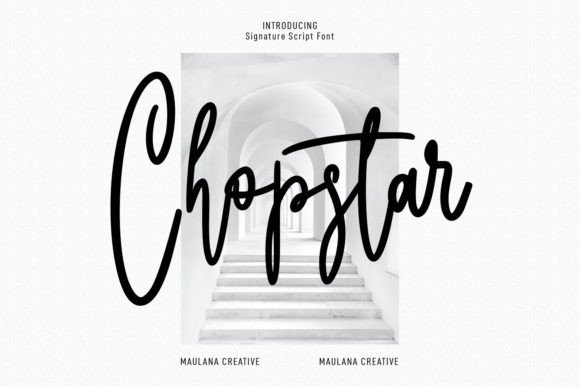
As a web designer, I often look for fonts that bring warmth and personality to digital experiences. Chopstar, an upright casual modern script handwritten font, delivers just that. Its clean curves and slightly stylized form make it ideal for wedding invitations where elegance meets approachability. But Chopstar’s appeal doesn’t stop at print — it translates beautifully into digital branding. Whether you’re crafting a luxury brand website or designing a custom landing page for a boutique planner, Chopstar adds a refined, personal touch that resonates with users on both mobile and desktop.
Using Chopstar in Landing Pages and Conversion-Focused Layouts
In conversion-driven design, the right font can influence how visitors perceive your message. Chopstar is particularly effective when used as a display font for hero titles or call-to-action buttons. The upright nature of this script handwritten font ensures legibility even at smaller sizes, while its modern feel keeps your design from looking outdated. For instance, a coaching website using Chopstar for a headline like “Design Your Best Life” feels more inviting than a standard sans serif. Pair it with a minimalist sans serif for body copy to maintain readability and guide the user’s eye toward key actions.
Chopstar in Online Store Banners and Product Headers
E-commerce sites need typography that balances charm with clarity. Chopstar excels here, especially for headers and banners that highlight product names or seasonal promotions. If you're running a boutique online store or selling curated lifestyle products, using this script handwritten font in your banner headlines creates a sense of curation and care. Just be sure to test its appearance on small screens and ensure it complements your color scheme. Chopstar works well on light backgrounds but should be avoided on dark ones unless you increase contrast with a bold stroke or drop shadow.
Enhancing Blog Headers and Creative Portfolio Sites with Chopstar
Bloggers and creative entrepreneurs know the importance of visual hierarchy. Chopstar brings a dynamic edge to blog headers and section titles without overwhelming the reader. It’s perfect for creative portfolio sites that want to stand out — think photography studios, illustration services, or UX/UI designers showcasing their work. Using Chopstar for section headings helps create rhythm in the layout, making content easier to scan. For body text, stick to a simple sans serif font to preserve readability, especially when dealing with long-form articles or project descriptions.
Why Chopstar Works Well for Logo Design and Branded Content
A logo needs to communicate a brand’s tone instantly. With Chopstar, you get a handwritten script font that conveys creativity and authenticity. This makes it a great choice for startups, lifestyle brands, or any business looking to establish a warm, human connection. When integrated into a brand kit, Chopstar supports consistency across websites, social media graphics, and email signatures. The font's subtle variations in letter spacing and stroke thickness allow for unique alternates, giving designers flexibility without compromising brand recognition.
Chopstar in Social Media Graphics and Digital Ads
Social media platforms are all about grabbing attention quickly. Chopstar is a premium script handwritten font that stands out in feed layouts, story highlights, and ad creatives. It’s particularly useful for short phrases, taglines, or inspirational quotes — common elements in Instagram posts, Facebook banners, or Pinterest pins. Since it’s designed for digital use, Chopstar handles anti-aliasing and pixel density well, ensuring it looks sharp on every screen. Use it sparingly for maximum impact, such as a bold headline over an image overlay or a decorative accent in a carousel ad.
Responsive Typography Tips for Chopstar
- Mobile Optimization: Chopstar maintains clarity at lower resolutions, but avoid using it in very small buttons or links. Reserve it for larger headers and key messages.
- Dark Backgrounds: Chopstar can appear muted on darker themes. Consider adding a slight outline or using a lighter variant if available.
- Image Overlays: Chopstar shines when used as a transparent overlay on photos or video thumbnails. Keep the contrast high to ensure legibility.
Chopstar for Editorial Design and Course Sales Pages
Course creators and educational SaaS platforms can benefit from Chopstar’s friendly yet professional demeanor. On course sales pages, it adds a personal flair to headlines like “Start Learning Today” or “Unlock Your Potential.” In editorial design, such as newsletters or magazine-style blogs, Chopstar can serve as a subheader or pull quote font. Always pair it with a strong serif or sans serif typeface for body copy to keep the reading experience smooth and engaging.
Font Pairing Recommendations with Chopstar
- Sans Serif Companions: Pair Chopstar with Helvetica Neue, Lato, or Montserrat for a clean, contemporary look.
- Serif Partners: For a more editorial or sophisticated vibe, match it with Georgia, Playfair Display, or Merriweather.
- Modern Contrast: Use a geometric sans serif like Futura or Bebas Neue alongside Chopstar to create striking typographic contrasts in your designs.
Ensuring Readability in Web Design with Chopstar
Readability is crucial for any font used in web design. While Chopstar is a decorative script, its upright structure and consistent stroke width make it more legible than many other script handwritten fonts. That said, it’s best suited for short texts rather than long paragraphs. When using it in headers or logos, always consider how it will render across devices. Avoid underlining or italicizing the font since it already has a natural slant. Instead, leverage bold weights or uppercase letters for emphasis in digital ads or pop-ups.
Commercial Use and Licensing for Chopstar
If you plan to use Chopstar in client projects, online stores, or commercial templates, verify the licensing terms. Many premium fonts require separate licenses for web embedding, app integration, or multi-user environments. Make sure the font you purchase includes webfont formats like WOFF or TTF if you intend to use it directly in CSS for responsive websites. Also, check if it supports multilingual characters for global audiences or e-commerce platforms targeting international markets.
Integrating Chopstar into a Brand Identity System
Brand identity is more than a logo — it’s about creating a cohesive visual language. Chopstar fits seamlessly into a brand-focused web design strategy by providing a signature style that reflects creativity and craftsmanship. Think of it as the voice of your brand in motion. For example, a handmade jewelry brand might use Chopstar for their main logo, paired with a neutral sans serif in pricing sections and product descriptions. This balance ensures the brand remains approachable while maintaining professionalism and clarity in all communication channels.
Chopstar for Greeting Cards and Interactive App Screens
Beyond websites, Chopstar can enhance interactive app screens and digital greeting cards. Its casual yet polished look is perfect for apps that focus on community, wellness, or lifestyle niches. In app UI design, it can be used for welcome screens, feature highlights, or motivational quotes within habit-tracking tools. Just remember to evaluate performance on different operating systems — some scripts may not render consistently on iOS versus Android. Testing is key to ensuring your script handwritten font choices deliver the intended experience across all platforms.
Practical Examples of Chopstar in Action
- Creative Portfolio Site: Use Chopstar for the site title and featured project headers to add character without sacrificing usability.
- Coaching Website: Apply it to hero sections and testimonials to convey trust and inspiration through personalized typography.
- Product Landing Page: Feature it in the main headline and value propositions to make your offer feel handcrafted and intentional.
- Digital Brand Kit: Include Chopstar as a secondary font for branded quotes, email signatures, and social media assets.
Maximizing Visual Hierarchy with Chopstar
Good typography guides the user’s eye naturally. Chopstar can act as a visual anchor in your layouts, especially when layered with contrasting fonts. In a UI context, using it for section headings or card titles adds a tactile quality that enhances user engagement. For example, a SaaS dashboard might use Chopstar for feature names while relying on a sans serif for data-heavy areas. This approach helps differentiate information types and improves the overall scanning behavior of your audience.
Chopstar for Thank You Cards and User Experience Touchpoints
Thank you cards aren’t just for print. They show up in digital thank you pages, email confirmations, and post-purchase experiences. Chopstar brings a heartfelt tone to these moments, reinforcing positive emotions and building brand loyalty. As a UI designer, I recommend using it in micro-interactions like confirmation modals or after-submitting forms. It also works well in branded thank you videos or customer appreciation emails when paired with appropriate background imagery and spacing.
Testing Chopstar Across Different Platforms and Formats
Before finalizing Chopstar for a web project, test it in real-world scenarios. Check how it renders in Google Fonts embeds, CSS @font-face declarations, and SVG-based text overlays. Ensure it scales well on retina displays and doesn’t blur in low-resolution contexts. Evaluate its compatibility with CMS platforms like WordPress or Shopify, and confirm that it works smoothly with your preferred design tools like Figma or Adobe XD. These checks help prevent unexpected issues when deploying your script handwritten font in live environments.
Chopstar for Quotes and Decorative Accents in Web Design
Quotes are powerful storytelling tools. Chopstar elevates them by adding a layer of authenticity and artistry. Whether it’s a client testimonial block or a motivational quote in a fitness app, this handwritten script font gives the impression of a personal message. However, use it judiciously — too much can distract from the core content. Limit it to accents, pull quotes, or sidebar widgets to maintain a clear focal point in your design.
Choosing Chopstar for Your Next Project
When selecting a font for your next digital project, ask whether it aligns with your brand’s tone and purpose. Chopstar isn’t just another script handwritten font — it’s a tool that connects your audience emotionally while supporting your visual goals. From elegant wedding invites to sleek landing pages, Chopstar offers a versatile, modern solution that stands out without shouting. Test it in your mockups today and see how it transforms your design assets into something memorable and impactful.